
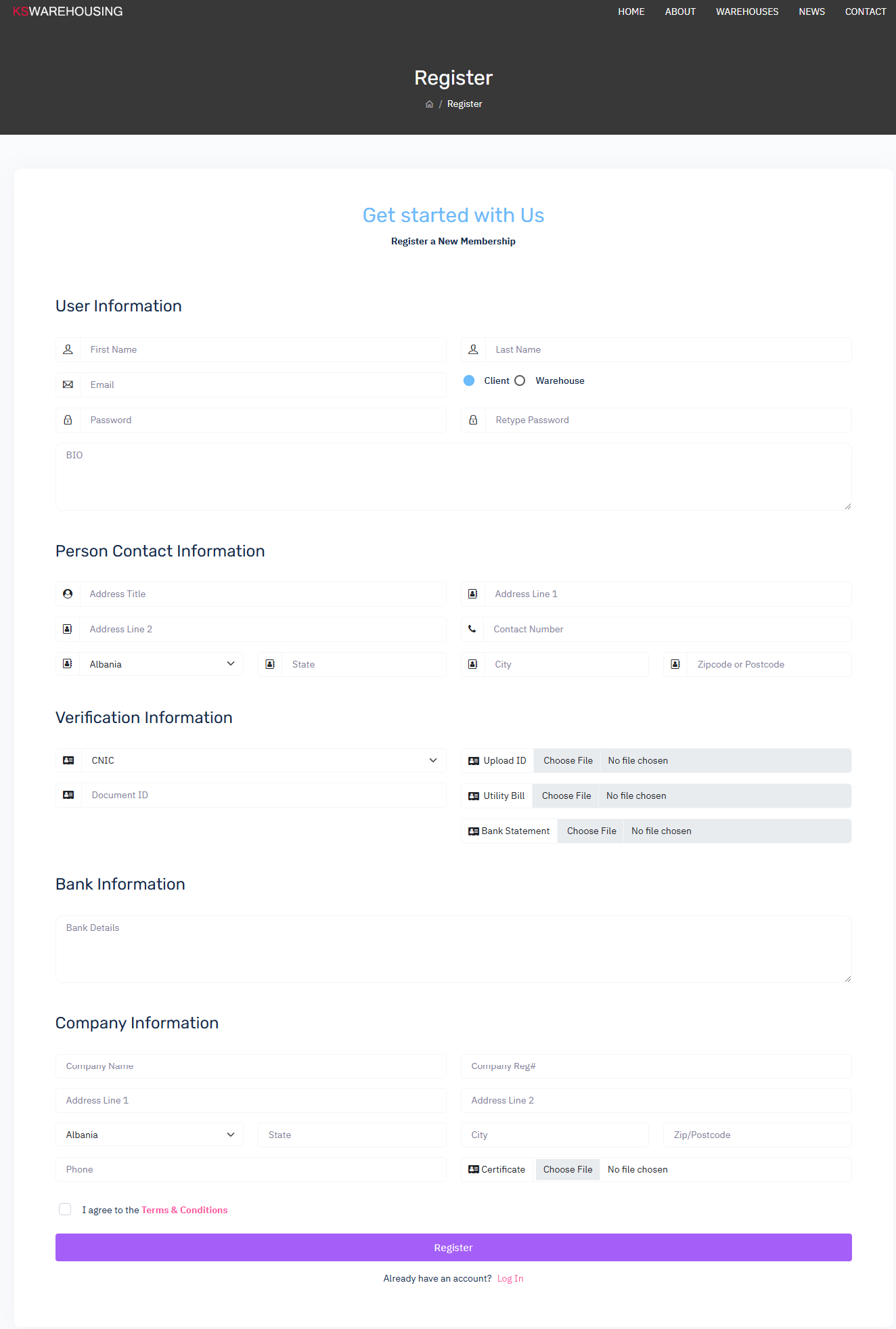
Field marked Red Are mandatory
User Information
- First Name
- Enter your first name as it appears on official documents.
- Last Name
- Enter your surname or family name.
- Email
- Provide a valid email address. This email will be used for communication, account verification, and password recovery.
- Password
- Create a secure password. It should be a combination of uppercase and lowercase letters, numbers, and special characters for enhanced security.
- Retype Password
- Re-enter the password to confirm it matches the one entered above.
- Select Registration type
- If you are Clint (Amazon Seller or any marketplaces seller) and looking for warehouse for you good packing and dispatching facilities for dropship or wholesale module and integration then choose Client Option.
- If you are warehouse owner and looking for Clint and proper inventory and dispatching system and have more then warehouse and willing to manage all inventory and within system willing to fulfill Clint dispatched or providing services for warehousing. Then Choose Warehouse Option.
- BIO
- Provide a short bio about yourself or your business, highlighting relevant experience or background.
Personal Contact Information
- Address Title
- Name your address for easy identification (e.g., "Home," "Office").
- Address Line 1
- Enter the primary part of your address (e.g., street name and number).
- Address Line 2 (Optional)
- Provide additional address details if necessary (e.g., apartment number, building name).
- Contact Number
- Provide a phone number, including the country code. This will be used for account verification and support communication. code must be with country code for USA +1 561-555-7689 or UK +44 1797 649276
- Country (Dropdown)
- Select your country from the dropdown list.
- State
- Enter your state or region.
- City
- Enter the city associated with your address.
- Zip Code or Postcode
- Provide the postal code for your area.
Verification Information
- Select ID type (National ID Number or Passport)
- Enter your national identification number or passport number for identity verification.
- Document ID
- Provide the ID number associated with your uploaded documents.
- Upload ID
- Upload a scanned copy of your identification document (e.g., passport, driver’s license).
- Utility Bill
- Upload a recent utility bill (e.g., electricity, water, gas) to verify your address.
- Bank Statement
- Upload a recent bank statement to verify your financial details.
Bank Information
- Bank Details
- Enter your bank name, branch, and account number. This information will be used for payment transactions within the KS system.
Company Information (For Business Accounts)
- Company Name
- Enter the full legal name of your company.
- Company Reg#
- Provide your company’s registration number as issued by the relevant government authority.
- Address Line 1
- Enter the primary address of your company’s headquarters or main office.
- Address Line 2 (Optional)
- Provide additional address details if necessary.
- Country
- Select the country where your business is registered.
- State
- Enter the state or region where your company operates.
- City
- Enter the city where your company is located.
- Zip/Postcode
- Provide the postal code for your company’s address.
- Phone
- Enter your company's main contact number.
- Company Certificate
- Upload a copy of your company’s registration or business certificate to verify legitimacy.
Login Option
- Already have an account? Log In
Tips for Successful Registration
- Ensure all required fields are completed accurately.
- Uploaded documents should be clear and in acceptable formats (e.g., PDF, JPG, PNG).
- Double-check your email and contact information for accuracy.
If you encounter any issues during registration, contact help@kswarehousing.com for assistance or open a ticket.